Custom sitemap in Siteleaf
 Siteleaf Logo, http://www.siteleaf.com
Jan 19, 2014
We love Siteleaf, and have started using it in almost all our new client projects. Siteleaf is perfect for out typical small business clients, and really speeds up both the sites and development. One issue we had was that the sitemap.xml that is autogenerated when a site is published, had some limitation.
The issues with the default sitemap.xml file
- The url to pages and posts misses the trailing slash (/) at the end of the url. This causes a 301 redirect when someone visits the page. It also created issues when we use Amazon Cloudfront as a CDN. Keeping all links with the trailing slash is important for these reasons.
- Not all pages get listed in the sitemap. It seems it only list top level pages, and not include subpages. We often use subpages for sites needing multilanguage capabilites.
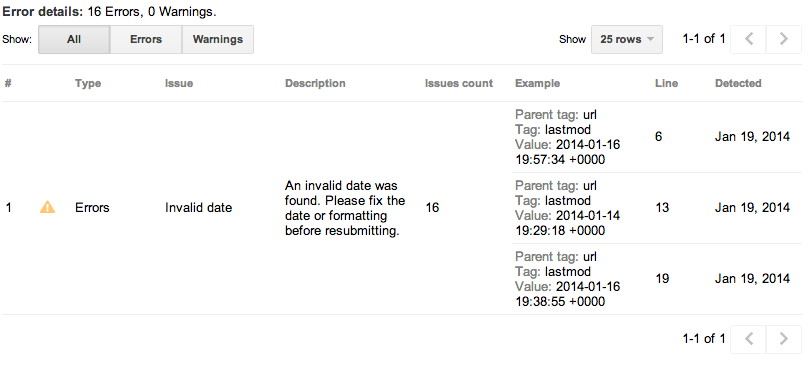
- The date in the <lastmod> block causes an error when we check in Google Webmasters tools. (se image below)
How we fix this in our projects.
We use a custom sitemap template to override the default generated Siteleaf sitemap.xml. You can create your own sitemap my creating a file called “sitemap.xml.liquid”, and place it on the root level of your theme.
We then use normal liquid syntax to loop through the pages and posts. It possible to tailor this to your need, but here is an example where we include all top-level pages, subpages and posts.
<?xml version="1.0" encoding="UTF-8"?>
<urlset xmlns="http://www.sitemaps.org/schemas/sitemap/0.9">
{% for page in site.pages %}
  <url>
    <loc>{% if page.home? %}{{page.permalink}}{% else %}{{page.permalink}}/{% endif %}</loc>
    <lastmod>{{page.updated_at| date: "%Y-%m-%d"}}</lastmod>
    <priority>1.0</priority>
  </url>
    {% for subpage in page.pages %}
     <url>
    <loc>{{subpage.permalink}}/</loc>
    <lastmod>{{subpage.updated_at| date: "%Y-%m-%d"}}</lastmod>
    <priority>0.8</priority>
    </url>
    {% endfor %}
    {% for post in page.posts %}
    <url>
      <loc>{{post.permalink}}/</loc>
      <lastmod>{{post.updated_at| date: "%Y-%m-%d"}}</lastmod>
      <priority>0.5</priority>
    </url>
  {% endfor %}
{% endfor %}
</urlset>
Extending on this template
You could also loop through tag and archive pages like this. You can also include time and not only date in the